Artificial intelligence is often presented as something complicated that only large companies can use. In practice, many businesses can start with much smaller applications.
A company does not need to automate its entire operation to benefit from AI. Sometimes, automating one repetitive task is enough to save time and make everyday work easier.
The most useful starting point is usually a task that happens frequently, follows a predictable process, and takes employees time without requiring constant human judgment.
Here are five practical business tasks where AI automation can make a difference.
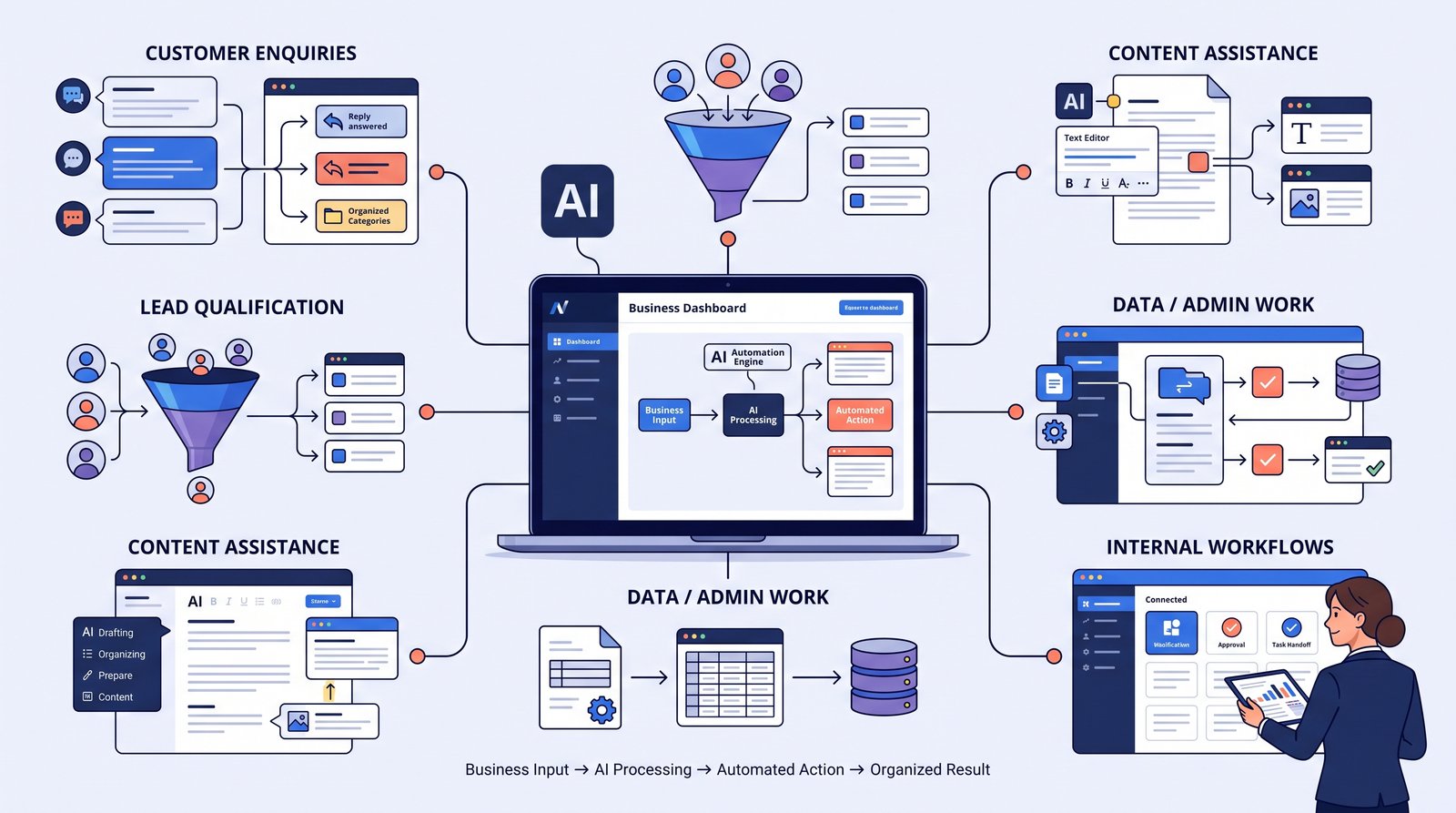
- Answering Routine Customer Questions
Customer enquiries are often repetitive.
- A business may receive the same questions every day:
What services do you offer?
What are your working hours?
Where are you located?
How can I book?
Do you deliver to my area?
How can I get a quotation?
An AI assistant can help answer these routine questions using approved business information.
This can be useful on a website or messaging platform, particularly when customers enquire outside normal working hours.
The important part is making sure the AI has accurate information. It should not invent prices, policies, availability, or other business details.
- Lead Qualification
Not every person who contacts a business is ready for a sales conversation.
AI automation can help collect basic information before a salesperson or team member gets involved.
- For example, an automated conversation could ask:
What service are you interested in?
What type of business do you operate?
What are you looking for help with?
When would you like to get started?
The answers can then be organized and passed to the relevant team member.
This gives the sales team context before the first human conversation and can reduce time spent collecting basic information.
- Turning Enquiries Into Organized Records
- Businesses often receive information through different channels:
- Website forms
- Social media
- Online booking forms
If those enquiries are recorded manually, information can be missed or entered inconsistently.
An automation workflow can take incoming information and organize it into a spreadsheet, CRM, database, or another business system.
- For example:
- Website enquiry
- ↓
- AI extracts important details
- ↓
- Lead record created
- ↓
- Sales team notified
The exact workflow depends on the tools a business already uses.
- Creating Routine Content
- Businesses regularly need content for:
- Social media
- Blog outlines
- Product descriptions
- Email drafts
Frequently Asked Questions
Not every business task is a good candidate for AI.
Start by looking for tasks that are:
Repetitive
The same type of work happens frequently.
Time-consuming
Employees spend noticeable time completing it.
Predictable
The process follows a reasonably clear pattern.
Low risk
An incorrect automated decision would not create serious consequences.
For example, sorting general enquiries may be a suitable starting point.
Making important financial, legal, or sensitive decisions without appropriate human oversight is a very different situation.
AI Automation vs Traditional Automation
These terms are often mixed together, but they are not exactly the same.
Traditional automation typically follows predefined rules.
For example:
If a customer submits a form → send an email notification.
AI automation can be useful when the information is less structured.
For example:
Customer sends a long message → AI identifies the topic → information is extracted → appropriate workflow is triggered.
The two can work together.
In many real business workflows, the best solution is not “AI everywhere.” It is using AI only where it adds genuine value.
The cost of AI automation depends on what you are automating.
A simple workflow that answers a few frequently asked questions may be relatively straightforward.
A more advanced system involving:
Multiple channels
CRM integration
Custom business logic
Large conversation volumes
Advanced AI models
Human handoff
Reporting and analytics
can require considerably more planning and maintenance.
Businesses should therefore start with the problem rather than choosing technology first.
Common Mistakes to Avoid
Automating a Bad Process
AI will not fix a process that is already confusing.
Improve the workflow first, then automate it.
Automating Everything
Some tasks genuinely need human judgment.
Keep people involved where accuracy, empathy, or decision-making matters.
Using Outdated Information
AI systems are only useful when the information they rely on is current and trustworthy.
Ignoring Exceptions
Real business processes rarely follow one perfect path.
Plan what happens when a customer asks something unexpected or the workflow cannot continue automatically.
Measuring Activity Instead of Results
Saving 20 minutes sounds useful, but businesses should also consider whether automation improves response time, reduces missed enquiries, increases conversions, or improves customer experience.
A Practical Way to Get Started
A simple approach is:
Step 1: Identify one repetitive task
Choose a process that happens often.
Step 2: Map the existing process
Write down what happens from beginning to end.
Step 3: Identify where human judgment is needed
Those parts should remain with people.
Step 4: Automate the predictable steps
Use regular automation rules and AI where language understanding is useful.
Step 5: Test with real examples
Look for unexpected cases before making the workflow fully operational.
Step 6: Review and improve
Automation should evolve as the business learns what works and what does not.
Frequently Asked Questions
Customer FAQs and simple lead qualification are often practical starting points because the conversations tend to follow recognizable patterns.
Not always. Some tools provide visual workflow builders, while more complex systems may require development and integration work.
Often, yes. The possibilities depend on the software, available APIs, webhooks, and integration options.
No. AI should be used when it solves a real business problem. A simple automation may sometimes be more appropriate than an AI-powered system.
Yes. Good automation usually includes human handoff, approval steps, and clear rules for situations where automated processing should stop.
Final Thoughts
AI automation is most useful when it solves a specific problem rather than simply adding artificial intelligence to a business because it is fashionable.
For many businesses, the best starting point may be something small: answering routine questions, qualifying enquiries, organizing incoming information, or reducing repetitive administrative work.
Once one workflow is working reliably, the business can decide whether other processes are worth automating.
The goal is not to automate everything. It is to make the right things easier.